Whenever we talk about GPU overclocking, it is often described in terms of speed. However, voltage also plays an equally important role. As without the proper voltage control higher clock speed can lead to instability, crashes, or long-term hardware issues. That’s why in this article. I am going to talk about how voltage works in GPU overclocking, why it matters, and when adjusting it makes sense.
What Is GPU Overclocking?
GPU overclocking is the process when the graphics card is tuned to run at a higher speed than its factory settings. The primary purpose of this setting is to improve performance in games, rendering tasks, or compute-heavy workloads like running LLM on the system.
GPU clock speed explained
Clock speed on the GPU decides how fast it processes the instructions. Normally, a higher clock speed means better performance, but it’s only possible when the GPU remains stable.
Core clock vs memory clock
- Core clock affects raw processing power and has a direct relationship with voltage.
- Memory clock controls how fast data moves between the GPU and VRAM and typically does not require voltage changes.
What Does Voltage Mean in a GPU?
Voltage is the electrical potential supplied to the GPU core. It decides how the transistors inside the GPU switch at a given frequency.
GPU core voltage (Vcore)
Vcore powers the GPU’s processing units. As clock speeds increase, the GPU often needs more voltage to maintain stable operation.
How GPUs regulate voltage internally
GPUs come with dynamic voltage and frequency scaling. It automatically adjusts voltage based on workload, temperature, and power limits. Manual voltage tuning overrides or shifts these predefined limits.
How Does Voltage Play in GPU Overclocking?
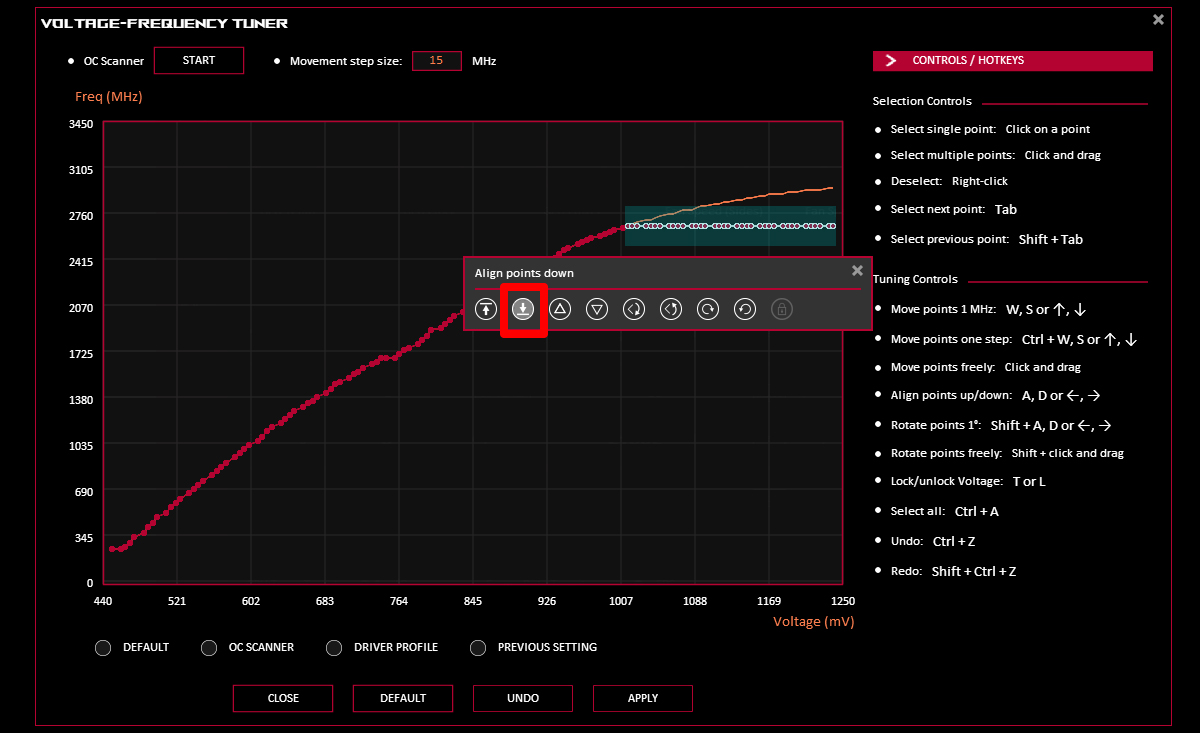
Voltage directly affects how high a GPU can be overclocked without becoming unstable. Basically it stabilizes GPU transistors during faster clock speeds.
Why higher clock speeds need more voltage
At higher frequencies, transistors switch faster and need stronger electrical signals. As a result without enough voltage, the timing error occurs and leads to crashes or graphical errors.
Relationship between voltage, frequency, and stability
- Higher frequency → more voltage needed
- More voltage → more heat and power draw
So the GPU is only stable when all three components remains in balance.
What happens if voltage is too low
- Driver crashes
- Application freezes
- Sudden system reboots
What happens if voltage is too high
- Excess heat output
- Faster silicon degradation
- Increased power consumption with little performance gain
Why Heat Matters in Overclocking?
Voltage and temperature are closely linked when it comes to GPU overclocking. So when the power consumption rises with the square of voltage, even a small voltage increase can lead to noticeably more heat. So, when the temperatures go beyond the safe limits, the GPU automatically reduces clock speed.
How Much Voltage Increase Is Safe for GPU Overclocking?
There is no universal safe voltage number when it comes to GPU overclocking. As the majority of the modern GPUs already operates close to their voltage limits. And usually, there is quite minimal headroom left for any manual voltage increases. However, there are some general guidelines around safe voltage limits:
- NVIDIA GPUs: Voltage increases are usually restricted by the driver and BIOS
- AMD GPUs: Offer more manual control but still enforce hard safety limits
Does Increasing Voltage Always Improve GPU Performance?
No, increasing voltage doesn’t always translate to better GPU performance. After a point, every single voltage increase yield is smaller clock gains while raising heat and power usage. If the GPU is limited by temperature, power limits, or silicon quality, then more voltage will not increase performance.
Voltage, Power Limit, and GPU Stability
Voltage is just the one part of the overclocking equation. Here’s the difference between voltage limit and power limit:
- Voltage limit: Maximum allowed core voltage
- Power limit: Maximum total power the GPU can draw
It’s important to keep in mind that even with higher voltage, the GPU might downclock if it reaches the power limit.
Common Risks of Increasing GPU Voltage
Increasing the voltage comes with some risks, even when it stays below the software limits. Here are some common examples:
- Long-term GPU degradation: Higher voltage accelerates electromigration, which slowly degrades the silicon of the GPU over time.
- System instability and crashes: Normally, unstable voltage settings are the root cause for crashes that are difficult to diagnose.
- Increased power consumption: Higher voltage also uses more electricity and puts extra stress on the power supply.
How to Adjust GPU Voltage Safely
If you are tuning the voltage of GPU, then it should be gradual and controlled. Here’s the guide to safely tune the voltage of your GPU:
- Increase clock speed first
- Test stability
- Adjust voltage only if instability appears
- Monitor temperature and power draw continuously
Signs Your GPU Voltage Settings Are Unstable
Usually, voltage instability shows clear warning signs. Apart from that, sudden application crashes, or driver reset messages could also indicate insufficient or excessive voltage.
Furthermore, flickering textures, coloured blocks, or screen freezes are some of the common symptoms of unstable core voltage of GPU.
Should You Increase Voltage for GPU Overclocking?
The simple answer is no. Voltage adjustment is not meant for everyone. Unless you are an experienced user with strong cooling solutions, or someone looking for pretty small performance gains. Apart from that, you should leave the voltage tuning if you are a beginner or if your system has limited cooling capacity. As tuning GPU voltage might affect the longevity of your hardware.
FAQs
GPU voltage powers the core for stable operation at set clock speeds. Higher voltage lets it handle faster clocks during overclocking, but boosts heat and power draw.
Overclocking voltage raises power to stabilize higher clocks, pushing performance limits. It risks more heat, throttling, and shorter lifespan if unchecked.
Only if clocks are voltage-limited, test stability first. Often, undervolting or power limit tweaks work better without extra risk.
No, it’s not inherently better. It enables overclocks but increases temps, power use, and wear; efficiency usually wins with stock or lower voltage.